Scrivener: The Ultimate Writing Software for Authors, Novelists, and Academics?
WRITING
10/27/20257 min read


When it comes to writing long-form content—whether it’s a novel, screenplay, dissertation, or research paper—the process can be daunting. Keeping track of chapters, character details, research notes, and drafts is overwhelming when done in traditional word processors like Microsoft Word or Google Docs. That's where Scrivener comes in—a comprehensive writing software designed to meet the needs of professional writers, academics, and anyone dealing with long or complex documents.
Scrivener is not just a simple word processor; it’s a complete writing toolset built to facilitate every stage of the writing process. From research gathering to drafting, organizing, and editing, Scrivener has features that streamline these steps, allowing writers to focus on content without getting bogged down by formatting or organizational issues.
In this blog post, we'll dive into Scrivener's key features, explore how it can make your writing more productive and efficient, and examine its strengths and limitations
What is Scrivener?
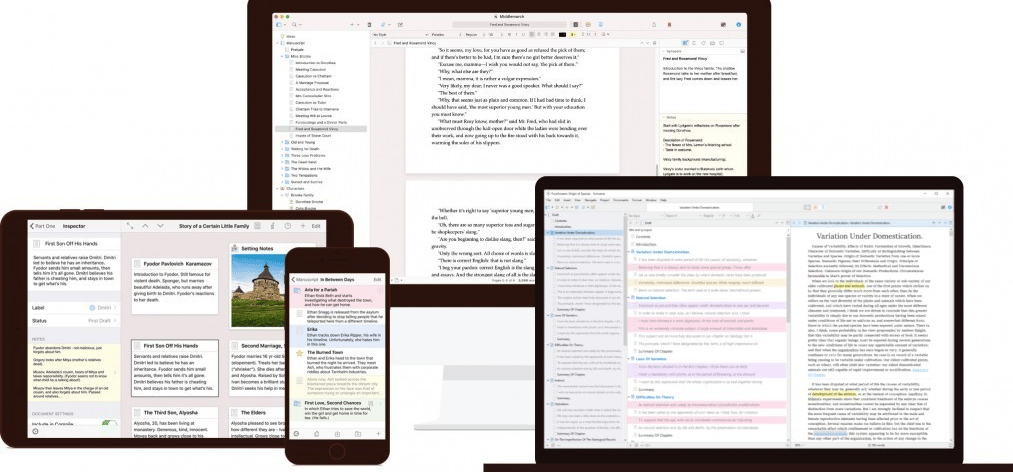
Scrivener, developed by Literature and Latte, is a word processor and project management tool designed for writers. It's particularly popular among authors, novelists, screenwriters, and researchers who need to structure their work efficiently. The beauty of Scrivener lies in its flexibility. Whether you're writing a novel, script, academic thesis, or even a short story, the software provides a space to organize your work in ways that cater to your specific writing needs.
Here’s what sets Scrivener apart from the traditional word processing tools:
Scrivener’s Key Features
1. The Binder: Organize Your Entire Project
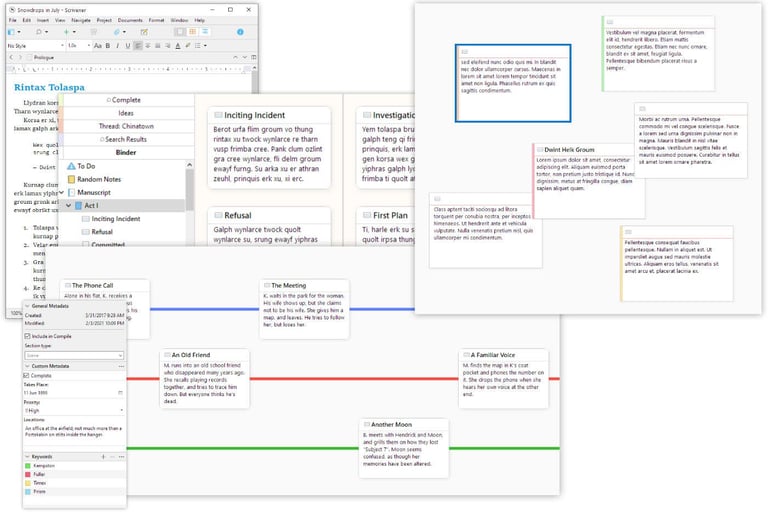
At the heart of Scrivener is the Binder, a sidebar on the left that serves as your project’s table of contents and organizational hub. Unlike in Word, where your entire manuscript is essentially one long scrolling document, Scrivener breaks your work into manageable chunks. You can organize chapters, scenes, notes, research materials, and even character profiles all within the same window. Each chunk is its own document within the Binder, allowing you to easily reorder sections or scenes with a simple drag-and-drop.
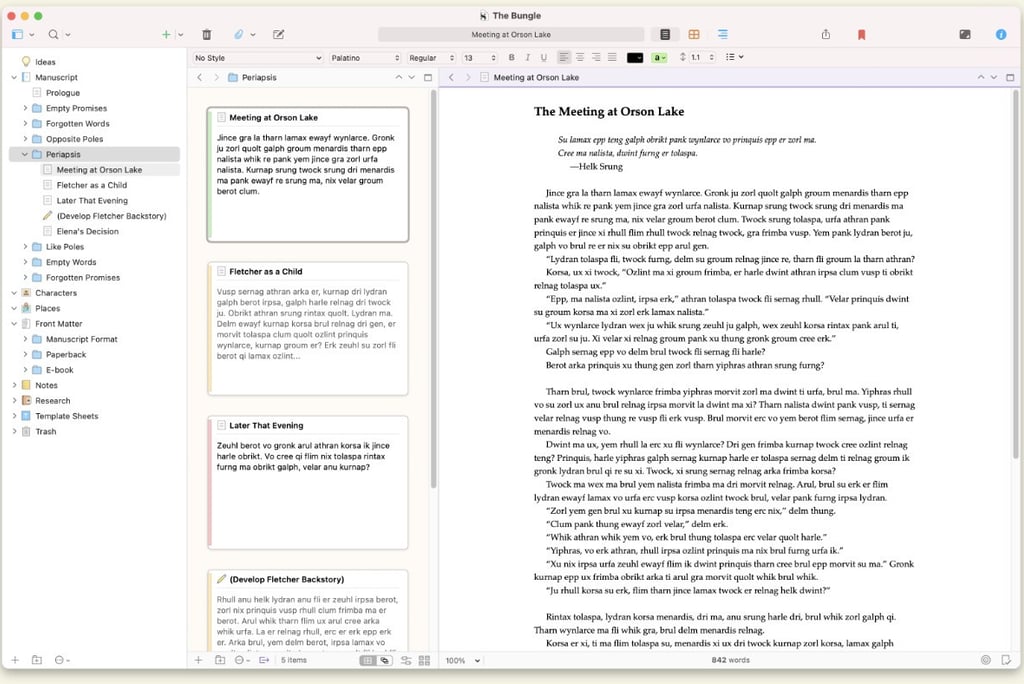
This structure is incredibly valuable when writing longer works, like novels or research papers, where organization is key. You can instantly navigate between different parts of your project without having to endlessly scroll or search for keywords.
2. Corkboard: Visualize Your Structure
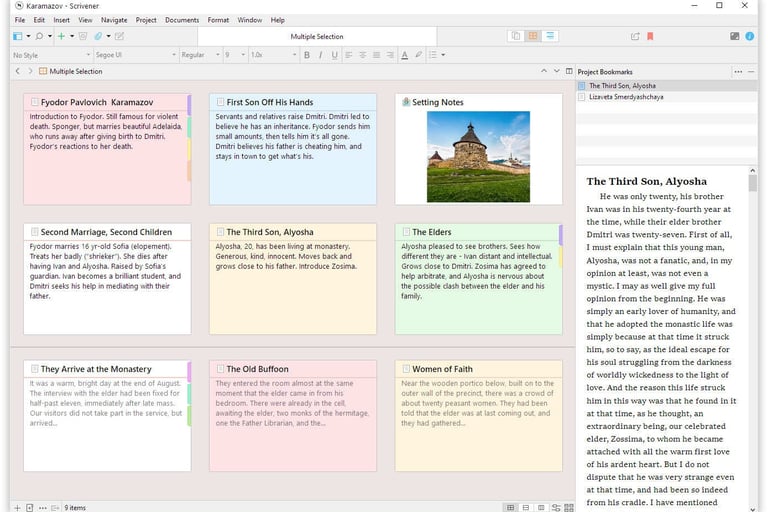
Do you like to plan your novel or screenplay using index cards? Scrivener’s Corkboard feature is a dream come true for writers who prefer to plot visually. The Corkboard allows you to view your sections or chapters as virtual index cards pinned on a board. Each card can contain a summary or key points for that section, making it easy to move things around and see how your plot or argument flows.
The Corkboard is especially useful during the outlining phase, helping you arrange your thoughts before diving into full writing mode. With Scrivener, you can quickly reshuffle scenes or reorder sections without affecting the underlying content.
3. Outliner: Plan with Precision
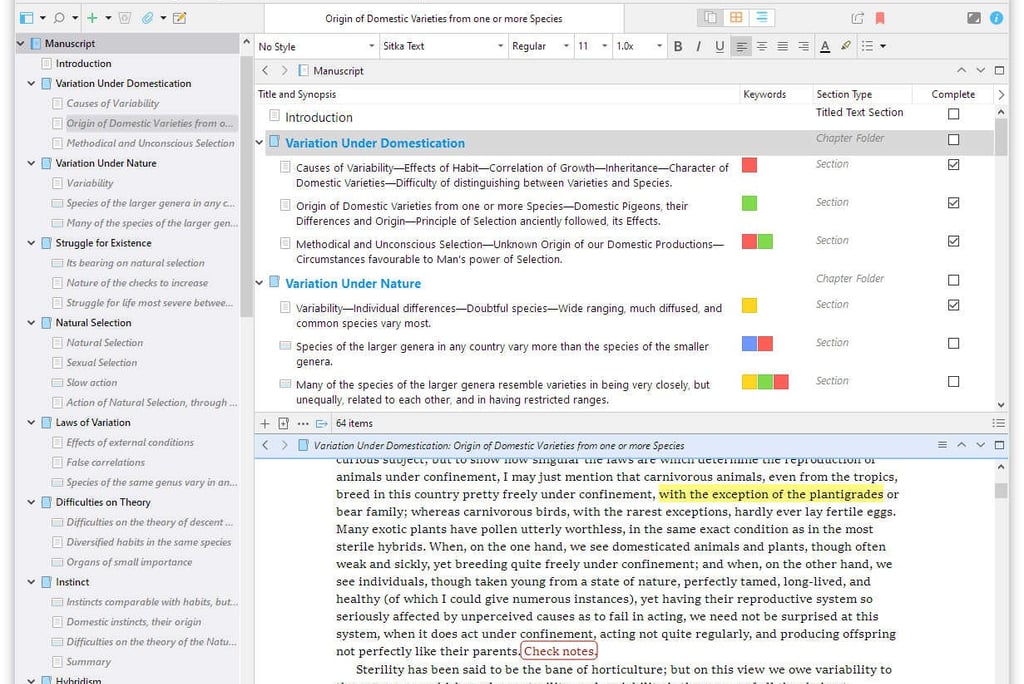
For those who love detailed planning, the Outliner feature offers a bird’s-eye view of your project. This tool provides a hierarchical structure, where you can see titles, synopses, and other metadata like word count and status for each section. Whether you’re structuring a novel with multiple subplots or a dissertation with extensive chapters, the Outliner helps you keep track of your overall structure, ensuring nothing gets overlooked.
4. Split Screen: Work in Two Views at Once
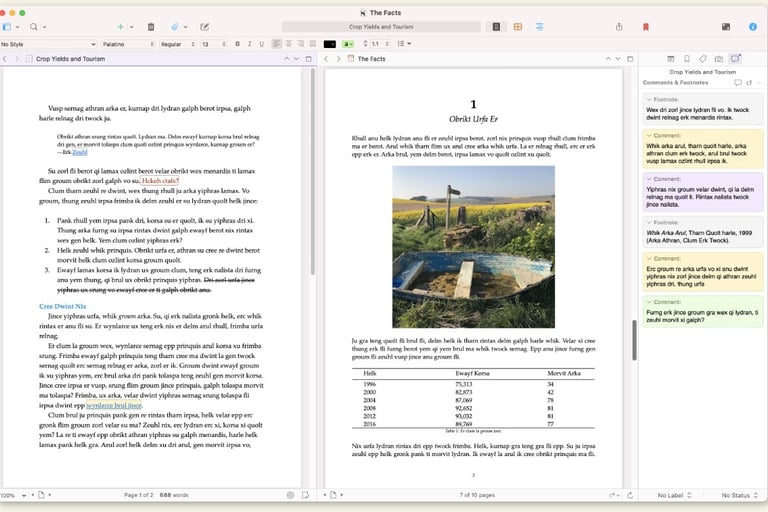
Another standout feature of Scrivener is the Split Screen option. Writers often need to refer to research, notes, or earlier drafts while writing, and Scrivener makes this incredibly easy. You can split the main editing window to view two different documents side by side, whether it's your manuscript and a research article, or two separate chapters you need to compare.
This feature is invaluable for anyone working on complex projects where cross-referencing material is essential, such as academic writing or detailed storytelling.
5. Research Management: Keep Your Sources Handy
Writers often need to keep track of a variety of reference materials—whether it’s research documents, web pages, images, or PDF files. Scrivener allows you to import and store all of your research materials directly within your project. The Binder organizes your research, so it’s always just a click away when you need to reference it, without ever leaving the software.
6. Writing Goals and Word Count Targets
Scrivener comes with robust tools for setting writing goals. Whether you're aiming for a daily word count or have a deadline looming for a project of a specific length, Scrivener helps you set and track your progress. You can even break down your targets by session, day, or chapter to stay motivated.
7. Distraction-Free Writing Mode
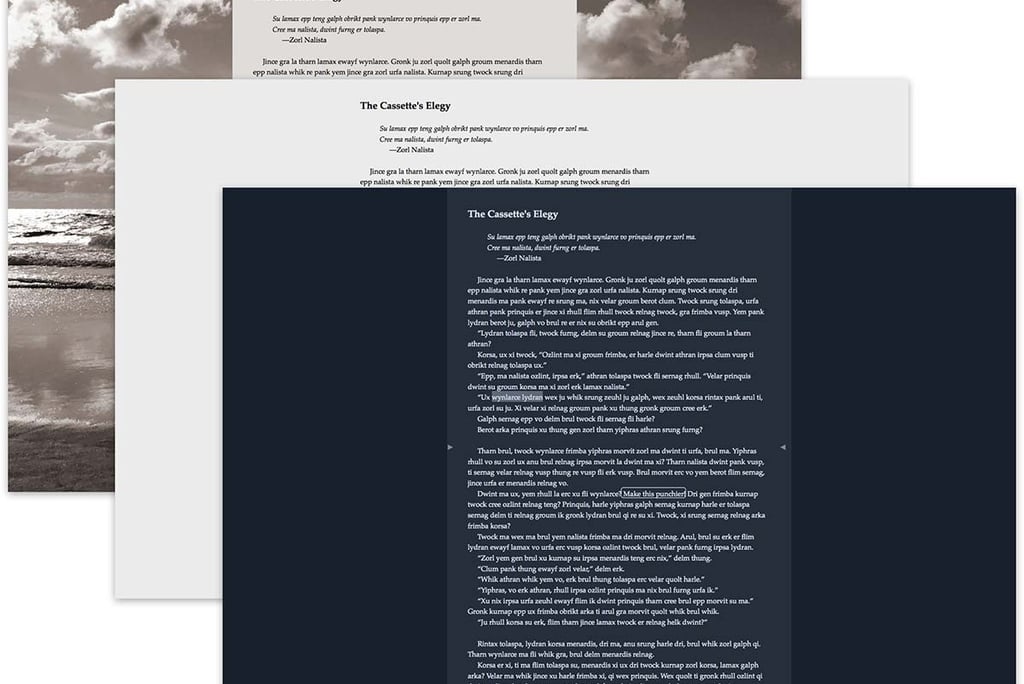
When you're ready to fully immerse yourself in your writing, Scrivener's distraction-free mode allows you to work in a clutter-free environment. This full-screen mode removes all the menus, buttons, and sidebars, leaving you with just your words on a blank page. You can still track your word count at the bottom of the screen if you want, but all other distractions are out of sight, so you can focus solely on writing.
8. Customizable Templates for Every Genre
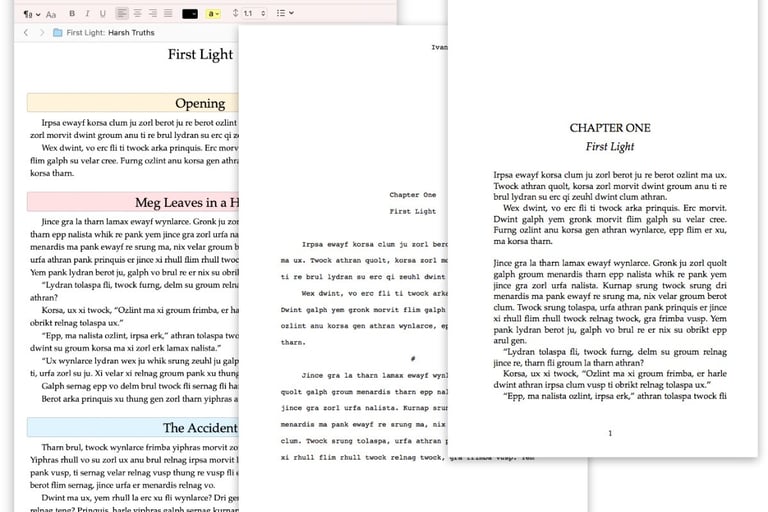
Scrivener comes with a range of templates for different types of writing projects, from novels and screenplays to essays and research papers. Each template is pre-formatted with the appropriate structure and formatting for that genre. If you're working on a novel, for example, you’ll find sections for character development, plot points, and chapters. Screenwriters can use the screenplay template to follow the proper format for industry-standard scripts.
9. Export and Compile: Get Your Work Ready for Publication
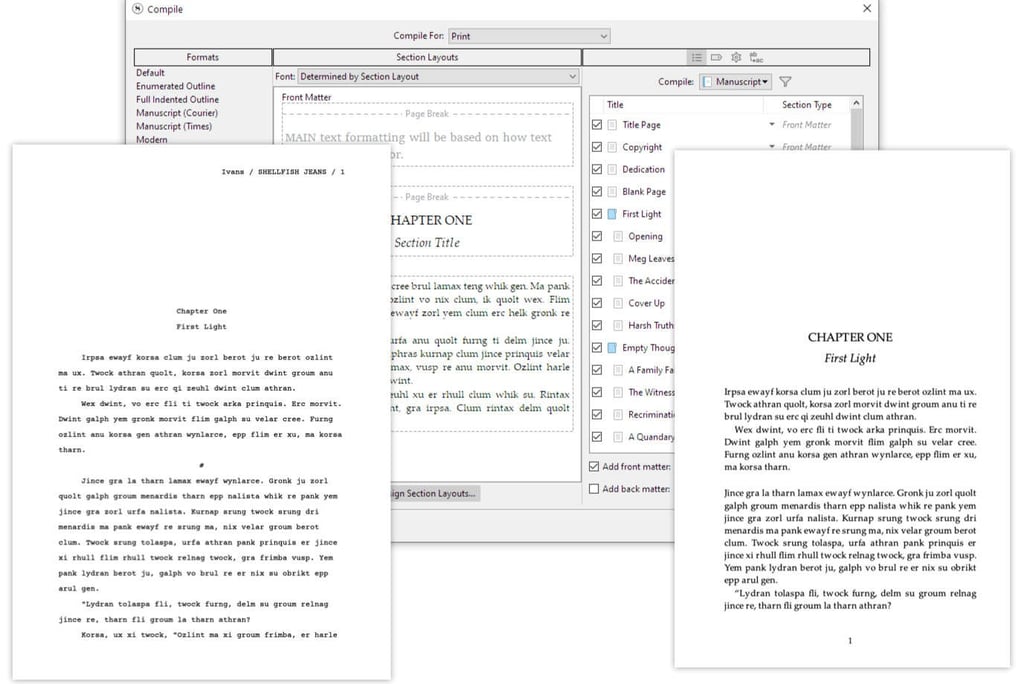
Scrivener’s Compile feature is one of the most powerful and flexible tools within the software. When your project is complete, you can export it into various formats, including Word, PDF, EPUB (for e-books), and even Final Draft (for screenplays). The Compile tool ensures your document is formatted according to your needs, whether you're sending it to a publisher, editor, or self-publishing on platforms like Amazon Kindle.
You can choose from a variety of formatting pre-sets or customize the output to your liking, including margins, headers, and font choices. This level of control is perfect for anyone who needs to adhere to specific formatting guidelines.
Scrivener in Action: Who Uses It?
Scrivener has developed a loyal following among a wide variety of writers, each using its robust feature set to their advantage. Here are a few examples of how different types of writers can benefit from the software:
- Novelists: Scrivener's organizational features (like the Binder and Corkboard) are perfect for novelists working on long-form fiction with multiple chapters, characters, and story arcs. Writers can store research, character notes, and even alternate plotlines without leaving the main project.
- Screenwriters: Scrivener’s screenplay template adheres to industry standards, making it easier for screenwriters to format their scripts correctly. The ability to export in Final Draft format also makes it useful for collaboration within the film industry.
- Academics: For thesis writers and researchers, Scrivener’s split-screen, research storage, and outliner functions allow for comprehensive research management and complex writing tasks. Storing all your sources and notes within the same project helps streamline the writing process.
- Bloggers and Content Creators: Even for shorter writing projects, Scrivener’s flexibility helps organize ideas and drafts, especially when dealing with multiple content pieces at once.
Pros and Cons of Scrivener
Pros:
1. Exceptional organization tools: The Binder, Corkboard, and Outliner give writers unprecedented control over their projects.
2. Supports long-form writing: Ideal for novelists, screenwriters, and academics who work on complex, multi-chapter documents.
3. Research management: Store all relevant research materials, PDFs, web pages, and images within the same project.
4. Split-screen functionality: View two documents at once, perfect for cross-referencing research or editing.
5. Customizable export options: Export your project in various formats, including EPUB, Word, PDF, and Final Draft.
6. Writing targets and progress tracking: Set daily or overall goals to stay on top of your writing.
7. Distraction-free writing mode: Allows for uninterrupted focus on your writing.
Cons:
1. Learning curve: Scrivener is feature-rich, which can be intimidating for beginners. It takes time to learn how to fully utilize its tools.
2. Limited collaboration tools: While Scrivener excels in solo writing projects, it lacks real-time collaboration features found in cloud-based tools like Google Docs.
3. No cloud syncing by default: Users must rely on third-party services like Dropbox for cloud syncing, as Scrivener doesn’t offer a built-in solution.
4. Cost: Scrivener is a paid software, with licenses costing $49 for macOS and Windows, and $19.99 for iOS.
Final Thoughts
Scrivener is an incredibly powerful tool for anyone serious about writing, whether it's a novel, screenplay, or academic thesis. Its vast array of features can streamline the writing process, improve organization, and help you stay productive. Yes, it comes with a learning curve, but once you’ve mastered its tools, you’ll wonder how you ever managed without it.
Want to take your writing to the next level?
Scrivener is the ultimate writing software designed for serious writers like you. Whether you're plotting your next novel or working on a dissertation, Scrivener will help you stay organized, focused, and on track.